Get Marketing Insights First
Subscribe to receive actionable strategies, growth tips, and industry insights delivered straight to your inbox.


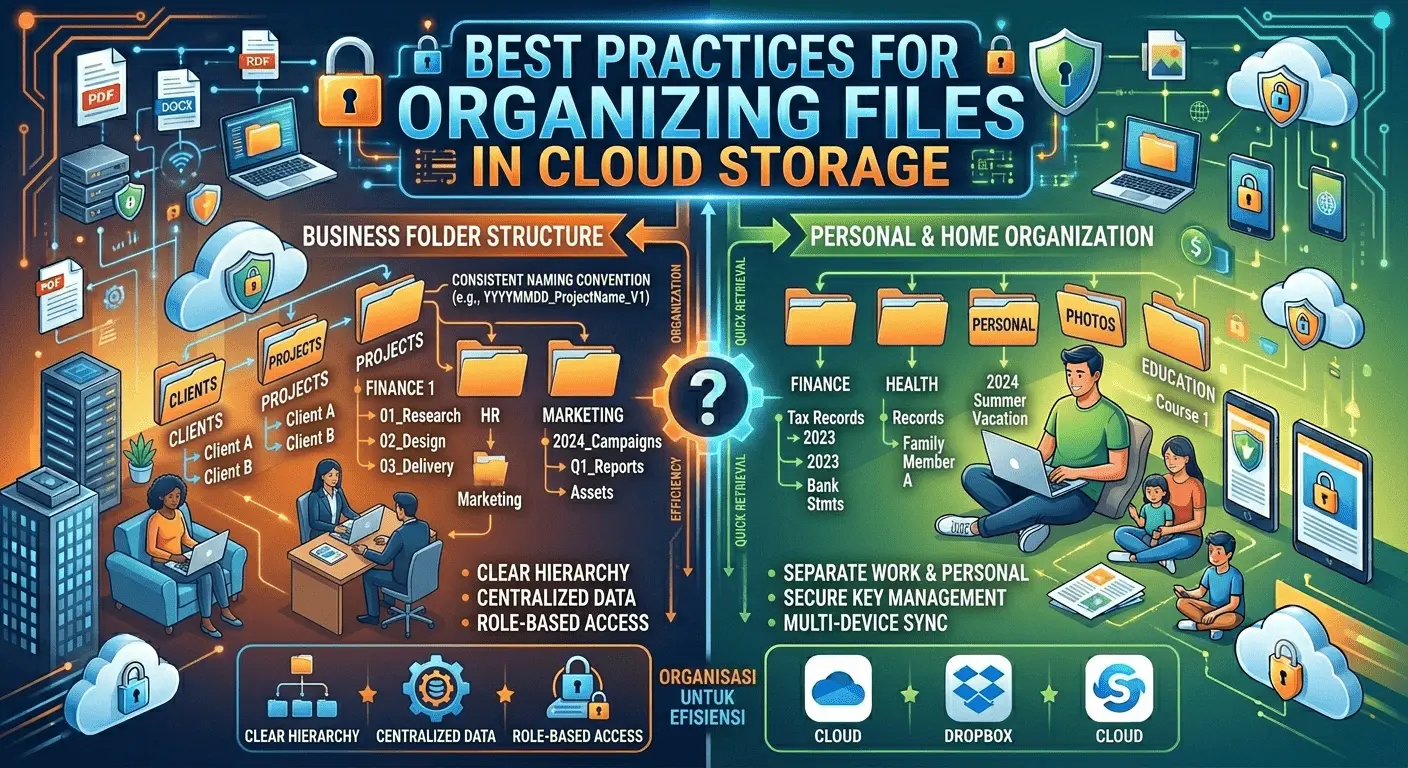
Cloud storage has become an essential part of modern work and personal productivity. From business documents and creative assets to personal photos and project files, cloud platforms make it easier than ever to store, access, and share information across devices.
However, as storage grows, many users face a common challenge: finding files quickly. Without a clear organization system, even the best cloud storage platform can become cluttered and difficult to manage. Implementing effective file organization strategies can save time, improve collaboration, and increase overall productivity.
Poorly organized cloud storage often leads to duplicated files, lost documents, inefficient workflows, and unnecessary frustration. A structured filing system helps users locate information faster while supporting better collaboration among teams and stakeholders.
According to Dropbox productivity resources, organized cloud storage reduces time spent searching for content and improves workflow efficiency through structured file management practices.
The foundation of effective cloud organization is a logical folder hierarchy. Create top-level folders that represent major categories such as projects, departments, clients, personal files, or business functions.
Within those folders, create subfolders that further organize content by project, date, client, or file type. Dropbox recommends establishing a clear folder and subfolder hierarchy that allows users to navigate quickly and locate information easily.
Consistent naming conventions make files easier to search, identify, and manage. Descriptive file names should clearly communicate the contents of a document without requiring users to open it.
Examples include:
Using standardized naming conventions across teams promotes consistency and reduces confusion.
Rather than storing files randomly, group them according to how they are used. Many organizations structure folders around projects, departments, clients, or business functions.
This approach aligns storage organization with actual workflows, making information easier to locate and manage.
Duplicate files consume storage space and create version control problems. Regularly review cloud storage and remove outdated or unnecessary duplicates.
Many productivity experts recommend archiving older files when necessary while maintaining a single authoritative version of active documents.
When multiple people collaborate on files, version management becomes critical. Instead of creating numerous copies with unclear names, establish a versioning system that clearly identifies updates.
Many cloud platforms offer built-in version history features that help teams track changes and restore previous versions when necessary.
One of the most effective organizational habits is filing documents as soon as they are created or received. Delaying organization often results in cluttered folders and misplaced files.
Dropbox recommends “filing as you go” to prevent backlogs and maintain a clean storage environment.
Not every file needs to remain in active folders forever. Create archive folders for completed projects, historical documents, and infrequently accessed materials.
Archiving helps maintain a streamlined workspace while preserving important information for future reference.
Organization should include security considerations. Sensitive documents containing financial information, legal records, customer data, or confidential business materials should be stored using appropriate access controls.
Modern cloud storage solutions often provide permission settings, encryption, password protection, and activity monitoring to enhance file security.
For businesses and collaborative teams, consistency is critical. Everyone should follow the same folder structures, naming conventions, and file management procedures.
A standardized approach helps prevent confusion and ensures that files remain accessible regardless of who created them.
File organization is not a one-time task. As projects evolve and storage grows, periodic reviews help keep systems efficient and relevant.
Monthly or quarterly maintenance sessions can identify clutter, outdated files, and opportunities for improvement.
The Dropbox Productivity Resources recommend creating clear folder hierarchies, maintaining consistent naming conventions, eliminating duplicate files, filing documents immediately, and regularly reviewing storage systems. These practices help improve productivity while making digital workspaces easier to manage.
Learning how to organize cloud files effectively can significantly reduce time spent searching for information and improve overall workflow efficiency.
Implementing strong digital file management practices today helps create a scalable foundation for future growth and collaboration.
Cloud storage offers tremendous flexibility and convenience, but its full value depends on effective organization. By creating structured folder systems, maintaining naming conventions, managing versions, and regularly reviewing storage practices, users can improve productivity and reduce digital clutter.
A well-organized cloud workspace makes collaboration easier, improves efficiency, and ensures that important files are always easy to find when needed.